Lightshot is a popular free tool for quickly grabbing a selected area of the screen and sharing it by short link. Page to Image focuses on webpages: full-page capture, local editing, and PNG, JPEG, or PDF files. Here is how they differ.
Full webpages, including content below the fold and inside scrolling panels, plus visible or selected areas
A selected area of the screen; no full-page or scrolling capture is described on the official site
Where it runs
Browser extension for Chrome, Edge, and Firefox
Apps for Windows and Mac, plus browser extensions
Editing
Crop, text, arrows, shapes, drawing, blur, and erase in Capture review
Editing during capture and an online editor
Sharing and privacy
Files stay on your device; nothing is uploaded
Uploads to its server to create a short share link
Export
PNG, adjustable-quality JPEG, or PDF
Image files or a hosted link
Price
9 free captures, then annual or lifetime access
Free
Vendor information checked October 14, 2026. Features and offers can change. See the official vendor sources below for current details.
When Page to Image fits
Choose Page to Image when the thing you want to save is a webpage, especially a long one: an article, a documentation page, a chat that scrolls inside its own panel, or a dashboard. You get the full page in one image, can mark it up in the same tab, and export a PNG, JPEG, or PDF file that never leaves your computer unless you send it.
When Lightshot fits
Lightshot is a good fit for quick, free captures of any part of your screen, including desktop apps, when an instant short link is the fastest way to share. Its official site describes area capture, editing, and upload to a short link; it does not describe full-page webpage capture.
Consider where your screenshots go
Hosted short links are convenient, but they place the image on a third-party server. For screenshots that contain customer data, internal dashboards, or unreleased designs, a tool that keeps the file local gives you control over who receives it.
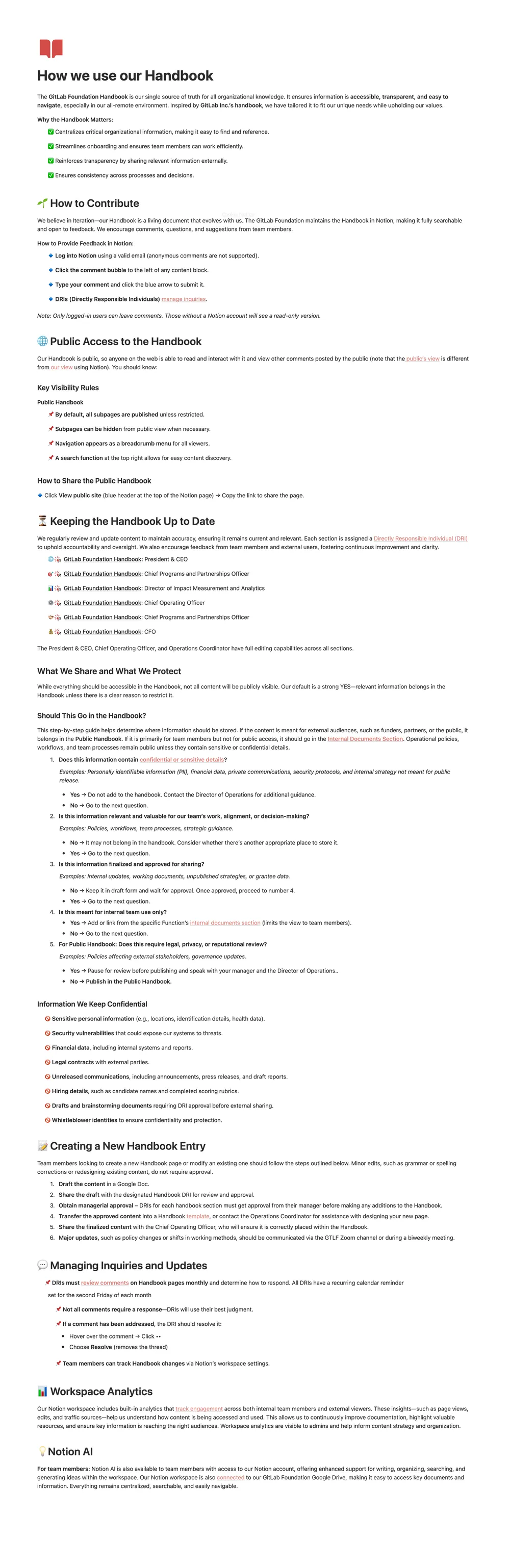
A Notion page that scrolls inside its own panel, captured from the title to the last section in one image.
Common questions
Can Lightshot capture a full webpage?
Lightshot’s official site describes capturing a selected area. For a full, scrolling webpage, use a browser’s full-page option or an extension such as Page to Image.
Does Page to Image create share links?
No. It saves files to your computer or copies the image to your clipboard, so you choose where to share them.
Can I use both?
Yes. Many people use a desktop tool for app windows and a browser extension for full webpages.